
A CSV file can look perfectly ordinary and still break an import. A product description may contain an unquoted comma. A customer identifier may have lost its first zero. A name may display correctly on one computer and turn into damaged characters on another. These are different problems, and a useful validation process keeps them separate rather than applying one large, irreversible cleanup.
This guide gives you a practical acceptance checklist for a file you are about to upload to a CRM, inventory system, database, or reporting pipeline. The goal is to find structural defects early, preserve meaningful values, and produce evidence that the receiving application imported the intended records. Start with a copy in the CSV validator, then work through the checks that matter for your destination.
The short answer: validate in four layers
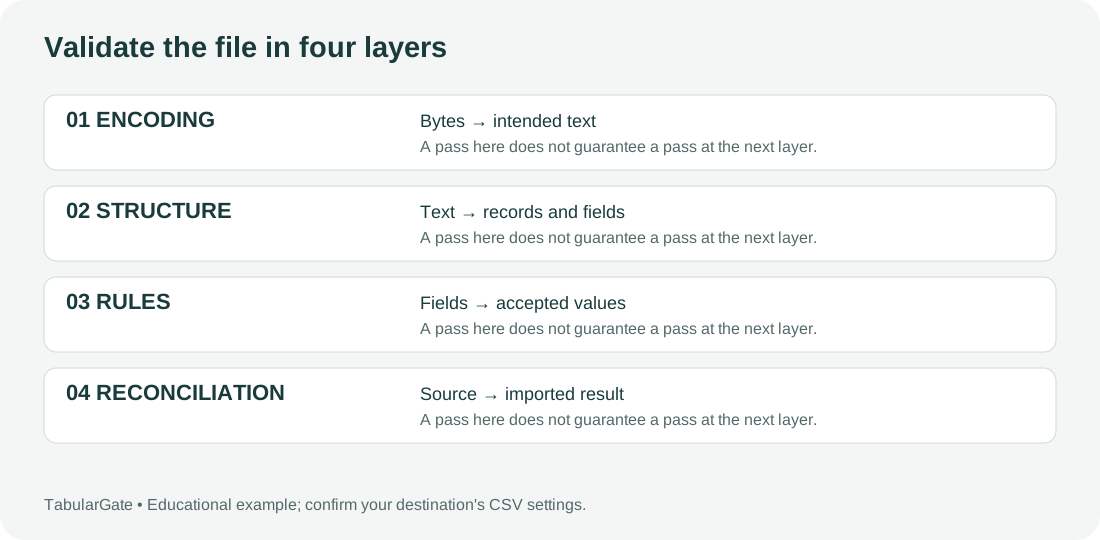
First, confirm that the original bytes can be decoded into the intended characters. Second, parse records and fields using the correct delimiter and quote rules. Third, compare the resulting table with the destination's column contract. Finally, reconcile the imported result with the source. A pass at one layer does not automatically establish a pass at the next.
| Layer | Question to answer | Evidence to keep |
|---|---|---|
| Encoding | Do names and symbols represent the original text? | Original file and representative character checks |
| Structure | Can the file be parsed into the intended records? | Delimiter, quote settings, record and field counts |
| Destination rules | Are these values allowed in these columns? | Field mapping, required values, duplicate policy |
| Reconciliation | Did the receiving system accept the intended data? | Accepted, rejected, and skipped record totals |
1. Preserve the original before opening it in a spreadsheet
Save the downloaded file in a clearly named source folder. Make a separate working copy for repairs, and do not use the same filename for both. If the data arrived by email, keep the original attachment rather than relying on a file somebody has already opened and saved. That distinction matters when an application has converted identifiers, normalized dates, or chosen a different text encoding during the save.
For a recurring import, record the export timestamp, source system, report filters, and expected reporting period. A structurally valid file for last month is still the wrong file for this month's import. Also note whether the export includes a header and whether the reported total includes deleted, inactive, or archived records. These small facts often explain apparent reconciliation failures better than a parser setting does.
Do not assume that changing a filename extension converts a format. Renaming a workbook from .xlsx to .csv does not produce comma-separated text. If a text editor shows binary-looking content or a file cannot be decoded as ordinary text, return to the exporting application and select an actual text export option.
2. Write down a small import contract
Before checking individual rows, list what the destination expects. Include the delimiter, encoding, header names, column order if order matters, and the meaning of an empty cell. Add the expected date representation, decimal separator, and uniqueness rules for identifiers. A one-page contract is easier to apply consistently than a collection of assumptions in somebody's memory.
Here is an illustrative contract for a stock import. It is an example, not a specification for every inventory product:
| Column | Intended meaning | Acceptance rule |
|---|---|---|
sku |
Product identifier | Nonempty text; retain leading zeros |
warehouse |
Location code | Must match an approved location |
quantity |
Units available | Whole number; negative values require a documented policy |
snapshot_date |
Date of stock count | Unambiguous calendar date in the agreed format |
Ask the owner of the receiving system to confirm unclear rules before editing the data. Whether a blank quantity means zero, unknown, or “leave the existing value unchanged” is a business decision. A structural validator cannot safely infer that decision from a comma and an empty field.
3. Check encoding with representative values
Review more than the first few ASCII-only rows. Include accented names, non-Latin text, currency symbols, and punctuation if they exist in the source. A preview containing only A, B, and digits does not establish that the entire file has the right character interpretation. Keep a few known reference values that you can compare with the source system.
If the displayed text is damaged, stop before applying spelling fixes. Determine whether the original bytes were decoded with the wrong encoding or whether the exporter already produced damaged text. Pasting into a website checks the text after another application has decoded it. Uploading the original file lets a tool inspect the file's bytes, subject to the tool's supported encodings and limits.
The CSV encoding guide explains a reversible way to investigate suspicious characters. For this checklist, the important acceptance criterion is simple: representative decoded values must agree with the source. “No decoding error appeared” is weaker evidence because some wrong interpretations still produce valid characters.
4. Confirm the delimiter before repairing any row
A file with semicolon-separated fields can be mistaken for a one-column comma-separated file. Conversely, a comma used as a decimal separator can produce extra columns if the reader has the wrong delimiter setting. Inspect the exporter configuration and the preview together. Changing the delimiter is a parsing decision, not an instruction to replace every occurrence of a character in the file.
Use this tiny sample to check your expectation:
sku,warehouse,quantity,snapshot_date
000742,NORTH,12,2026-10-26
000743,SOUTH,0,2026-10-26
Under a comma delimiter, the header contains four fields and there are two data records. Under a semicolon delimiter, the same text becomes one field per record. Both readers may technically return a table; only one matches this example's intended import contract. Check the parsed column labels before diagnosing the individual field values.
5. Count records after parsing, not after splitting lines
A quoted description can contain a line break. Therefore, the number of physical text lines is not necessarily the number of records. Similarly, a comma inside a correctly quoted field is part of its value. Counting every comma on each line can produce a false alarm on a valid file.
For common CSV quoting conventions, RFC 4180 describes enclosing fields containing commas, quotes, or line breaks and doubling quotation marks within quoted values. It is an informational reference; actual importers may require a particular dialect. Use that distinction to explain your parsing settings rather than assuming that every application handles every CSV variation identically.
Run a parser-aware structural check and review the earliest reported defect. A missing closing quote can absorb several later lines into one field, so subsequent row-count messages may be consequences of the first defect. The CSV validator is a useful checkpoint here, but an unexplained row-count difference still needs human investigation.
6. Check headers as a mapping problem
Compare the header with the import template. Look for duplicate names, empty names, unexpected whitespace, and invisible characters at the start of the first name. Decide whether the destination maps columns by name or by position. A column named customer_id in the wrong position may be harmless in a name-based import and disastrous in a position-based one.
Do not automatically lowercase every heading or delete every space. Some destinations expect a specific template. If a supplier changes Product Code to product_code, confirm that the mapping is still correct. Keep the original label and the mapped destination field in a small mapping table so another operator can reproduce the same import.
Also check whether a report title or explanatory sentence precedes the header. A human-readable export sometimes starts with a date, company name, or blank line. Configure an importer to skip documented preamble rows when supported, or request a clean machine-readable export. Do not silently discard the first nonempty row without checking what it contains.
7. Separate missing fields from empty values
The records below do not have the same structure:
000742,NORTH,12,
000743,SOUTH,0
With a four-column header, the first record contains an empty fourth field. The second contains only three fields. That difference tells you where to investigate, but it does not tell you whether the date was intentionally omitted. Adding a final comma changes structure; filling the date changes meaning. Treat them as separate decisions.
When a row contains too many fields, do not fix it by truncating the extras. An unquoted comma inside a description can shift every later value. When a row contains too few fields, do not assume the missing value belongs at the end. Compare a reliable source record with the parsed fields and document the exact repair. See the inconsistent CSV columns guide for worked examples.
8. Review values using the destination's business rules
Once the table parses correctly, check required fields, allowed categories, ranges, and relationships. A quantity containing twelve may be legitimate source text but unacceptable to a numeric destination. A date can be well-formed and still fall outside the reporting period. A customer code can match a pattern while referring to a customer that does not exist.
Keep identifier checks separate from numeric checks. Product codes, postal codes, account references, and telephone numbers often behave as labels rather than quantities. Adding or subtracting them would make no sense. Treating these fields as text helps preserve significant zeros and avoids transformations that may occur when a spreadsheet guesses types.
Write down whether you are validating every row or reviewing a sample. A sample is useful for confirming a mapping; it does not prove that every later row meets the rule. For high-impact imports, implement full-column checks or use the destination's own validation preview. Never turn a small manual spot check into a claim that the entire dataset is error-free.
9. Define a duplicate policy before deleting duplicates
Two identical rows might be accidental duplication, or they might represent two legitimate events. Two rows with the same customer identifier might contain different updates that must be applied in order. Select a business key and a policy before removing anything. “Keep the first row” is a transformation rule, not a neutral cleanup.
For a stock snapshot, the key might be the combination of sku, warehouse, and snapshot_date. For a sales event file, the event identifier might be the only reliable key. Count duplicate keys, inspect conflicting values, and ask the data owner how to resolve conflicts. Keep a separate exception file rather than erasing evidence of the conflict.
If the destination updates existing records, also confirm whether the operation is an insert, update, or upsert. A valid file can create unwanted records if the import mode is wrong. Trial the operation on a controlled subset when the receiving application provides a safe preview or test environment.
10. Reconcile a trial import before accepting the batch
Create a simple control sheet with source data records, accepted records, rejected records, and records intentionally skipped. Keep header rows out of the source record count. In a destination where these categories are mutually exclusive and cover the whole batch, the following reconciliation should hold:
source data records = accepted + rejected + intentionally skipped
This equation does not apply unchanged to every importer. Some tools count operations instead of rows, split one row into several objects, or report updated and inserted records separately. Document what each counter means before comparing totals. An unexplained difference is a reason to investigate, not a reason to change the source count until the numbers agree.
Inspect representative imported records, including those containing zeros, punctuation, and non-ASCII text. If monetary or quantity totals matter, compare suitable source and destination aggregates as well. Matching row counts alone will not detect values that landed in the wrong columns.
A repeatable release checklist for the next file
Use a named parsing profile or a written settings sheet for recurring exports. Record the encoding, delimiter, header handling, validation rules, exception policy, and destination mapping. Keep the settings version with the file rather than relying on a screenshot that may not show all options. When the supplier changes its export layout, review the contract before reusing the old settings.
Before the final upload, run the working file through the CSV validator again and inspect the downloaded result as text. Confirm that only intended changes occurred. Record the operator, timestamp, file version, exception count, and destination outcome. If you cannot explain a transformation, stop and return to the preserved original.
TabularGate currently provides guest structural checks and previews. It does not certify a destination's business rules, guarantee import acceptance, or automatically reconstruct missing business values. Uploaded data is processed on the server; review the privacy notice and your organization's data-handling policy before submitting confidential records. Use synthetic examples when you only need to test parsing behavior.
Frequently asked questions
Is a CSV valid if Excel opens it?
Opening a file demonstrates that Excel produced a view of the data. It does not establish that another importer uses the same delimiter, encoding, or type conversion. Compare the raw text, parsed fields, and destination mapping. Pay particular attention to identifiers and date-like strings that can look reasonable after an unintended conversion.
Should every warning block an import?
Use a documented acceptance policy. A warning about an optional blank field may be acceptable, while a warning about shifted columns may be critical. Make that decision before the production upload, and record accepted exceptions. A “continue anyway” button is not a substitute for understanding the warning.
Can I repair the file by saving it again as CSV?
Sometimes a fresh export solves a source problem, but a spreadsheet save can introduce new transformations. It cannot reliably restore characters or zeros already lost. Preserve the original, make a targeted change, and repeat the structural and reconciliation checks before accepting the new version.
References and scope
These are primary references for format and parsing concepts, not endorsements of this website: RFC 4180, the W3C tabular data model, and Python's CSV documentation. All datasets and examples in this guide are illustrative. The checklist is an editorial workflow rather than a measured benchmark or a promise that every import system behaves alike.